Your servers. Your browser.
Spelara runs on your Windows machine and opens on localhost:3001. From there you install game servers (via SteamCMD or direct download), start and stop them, send console commands, watch their logs live, and edit config files — without touching a terminal.
Free & open source Loading version…
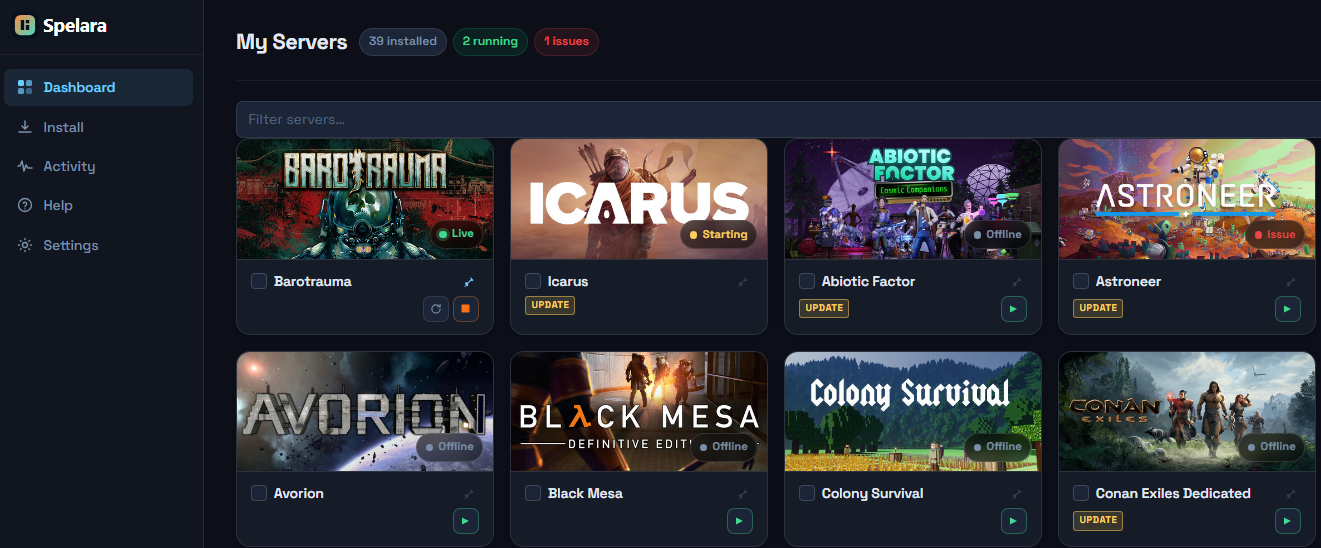
What it does
Spelara is not a game panel SaaS. It's a local Node.js app that runs on your Windows machine. You manage everything through your browser — no agents, no cloud sync, no subscription.
Install
SteamCMD or direct download, with live progress
Pick a game from the catalog, type a folder path, hit Install. Most servers download through SteamCMD with output streamed to you in real time; non-Steam games like Minecraft and Terraria download directly, and Java servers run on a bundled Java runtime — no separate install. When it's done, the server appears on your dashboard ready to start.
Run
Starts servers as hidden Windows processes
Spelara launches your server executable with the right flags and keeps track of the process. If it crashes, you can configure it to restart automatically — up to a limit you set before it stops trying.
Logs
What the process prints, you see instantly
Open any server and go to the Logs tab. Output streams over WebSocket in real time — no page refresh, no polling.
Config
Edit config files in your browser
Spelara scans the server folder and surfaces the config files — INI, JSON, XML, YAML, CFG. You edit them in a browser-based editor with automatic backups — if you break something, restore the previous version in one click.
Remote
HTTPS + TOTP for access outside your network
Enable remote access in Settings and Spelara sets up HTTPS with a self-signed certificate. Protect it with a password and TOTP — scan the QR code with any authenticator app. An optional guest account lets others view servers without being able to control them.
Schedule
Timed restarts without cron
Set a recurring action — start, stop, or restart — for any server. Pick the days of the week, a time, and a timezone. Useful for daily restarts or scheduled maintenance windows.
Console
Send commands to a running server
For console-driven servers, type a command on the Logs page and Spelara sends it straight to the server's input — run things like Hytale's /auth login or a Minecraft save/op without opening a terminal.
Alerts
Discord notifications on start, stop & crash
Point Spelara at a Discord webhook and get a message the moment a server starts, stops, or crashes — so you know when something goes down without watching the dashboard.
Windows installer. Installs to Program Files, opens on localhost:3001.
Download for Windows